Meow-tastic DIY: Create a Purr-fect Cat Phone Case with HTVRONT H17!
Written by Hailey Chen
|
Published on
|
Modified on
|
Reading time for 7 min
Table of Contents
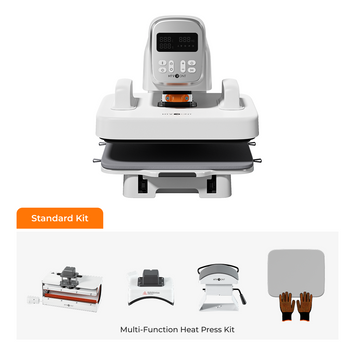
I was tinkering with my newly arrived HTVRONT H17 heat press in the studio last week when I had a flash of insight: why not make a super cute cat phone case? So I did it! After a few attempts (and a failed transfer film or two), I finally made a finished product that I love. I'm sharing this super fun process with you today!
Sublimation heat pressing uses heat and pressure to transfer dye from a printed film into the coating of a phone case, creating a permanent, full‑color design that won't peel or fade. The HTVRONT H17 phone case heat press makes this process incredibly simple — and the results are purr-fectly stunning!
What You'll Need
Gather these essentials before you start: the HTVRONT H17 heat press, sublimation materials, and a healthy dose of creativity.
I remember the first time I made a cell phone case — I forgot to buy heat transfer tape, and the pattern pressed crooked. Heartbreaking! This time, let's take inventory of the materials properly.
Scissors or a precision cutting tool — for trimming film.
Heat-resistant tape — to secure the film during pressing.
LOKLiK IdeaStudio software — for designing your artwork.
Computer and sublimation printer — to print your design.
Design inspiration — your favorite cat photo or illustration!
Step 1: Design Your Meow-sterpiece!
Create and print your cat design using LOKLiK IdeaStudio. Proper settings are crucial for a crisp, vibrant transfer.
Speaking of design inspiration, I was sipping coffee and browsing Instagram when I suddenly came across a fat orange cat so cute I immediately took a screenshot! Later, I realized that the most touching designs are often hidden in these life moments.
Design Tips
✔ High-resolution images work best for crisp, clear transfers.
✔ Bright, vibrant colors will pop beautifully on the glossy case.
✔ Leave a small border around your design to ensure full coverage.
Printing on Sublimation Film
Now, open your artwork in LOKLiK IdeaStudio and follow these crucial settings:
1. Media Type: Select "High-Quality Glossy" for the best results. If this option isn't available, choose "Transparency" or "Thick Paper" as alternatives.
2. Print Quality: Always set this to "High" to capture every tiny detail of your adorable cat design.
3. Mirror Image:This is super important! Make sure to check this box, or your design will transfer backward – and nobody wants a reverse cat! 🙀
Troubleshooting Printing Issues
Sometimes, sublimation film can be tricky to feed through printers. Here's how to handle common problems:
✔ If the film jams: Try placing a small label on the bottom edge of the film to help guide it through smoothly.
✔ If misprints occur: Attach a standard A4 sheet behind your sublimation film to improve feeding and help the printer's sensors detect the paper correctly.
Pro Tip: Do a test print on regular paper first to check colors, sizing, and alignment before using your precious sublimation film!
Step 2: Heat Press Magic!
Transfer your design onto the phone case using the HTVRONT H17. Proper settings and technique are key to perfect results.
Now for the exciting part — transferring your design onto the phone case! The HTVRONT H17 makes this process easy, but proper settings are key to perfect results.
Heat Press Settings
Setting
Value
Upper Heat Plate Temperature
135°C
Lower Heat Plate Temperature
135°C
Preheating Time
2–10 seconds
Heat-up Time
300 seconds (5 minutes)
Set it for five minutes? I know you want to peek! But really, don't open the lid — I couldn't resist last time, and it ended badly!
Step-by-Step Pressing Instructions
Let's talk about those things in practice! The first time I used the HTVRONT H17 phone case heat press, I was so busy my hands and feet were like a novice cooking for the first time. Here is the blood-and-tears experience summarized in real life:
1. Prepare Your Workspace:
The machine should be plugged into a separate outlet (don't ask why, you know it will trip).
Always wear two gloves! (The burn scar on my left hand still reminds me of that.)
2. Protecting the Lens:
Lens protection is so important! You need to use the small square to protect the lens before heat pressing!
👉 Correct operating position: Align the small square to the lens position, use the tape to stick the square to the lens of the phone case before putting it into the HTVRONT H17 (otherwise it will shift!)
3. Position Your Design:
Carefully place your printed sublimation film (ink-side down) onto the case. Use heat-resistant tape to secure it in place — this prevents shifting during pressing.
4. Press Time!
Close the HTVRONT H17 and set the timer for 300 seconds (5 minutes). The 5 minutes of waiting are the worst!
5. Uncovering the film is the most exciting moment! Be as quick and accurate as ripping off a band-aid:
45-degree angle is perfect!
Sticky edges? Use tweezers to gently assist.
Got air bubbles? Use a squeegee to get it out while it's still hot!
Pro Tip: If you notice any areas where the ink didn't transfer perfectly, you can carefully reposition the film and press for an additional 10–20 seconds. But avoid over-pressing, as this can cause colors to blur.
Step 3: Admire Your Furry Masterpiece!
Remove the film, inspect the transfer quality, and enjoy your custom creation!
The moment the film was removed — oh my! That gradient color cat hair is too real! The feeling of accomplishment when you touch the smooth surface... Allow it to cool completely for a few minutes before placing it on your phone.
Quality Check
Are the colors as vibrant as expected?
Are all edges fully transferred?
Is the design centered correctly?
If everything looks perfect, congratulations! You've just created a one-of-a-kind accessory. If there are minor imperfections, don't worry — each project is a learning experience!
Pro Tips for Paw-some Results
Want to take your sublimation skills to the next level? Here are some expert tips:
✔ Always wear heat-resistant gloves – The press and case get very hot!
✔ Work in a clean, dust-free area – Dust particles can cause imperfections in your transfer.
✔ Store sublimation film properly – Keep it in a dry, cool place to prevent moisture damage.
✔ Experiment with pressure – If colors aren't transferring well, slightly adjust the pressure settings.
✔ Use high-quality blanks – Cheap shells really do melt! Don't save money here, trust me.
✔ Practice makes perfect – The most practical advice: always make the first shell for yourself! Give them away when you get the feel for it.
✓ Cat Phone Case Sublimation Checklist
□ High-resolution cat image ready
□ Mirror the design before printing
□ Load sublimation film with matte side up
□ Set H17 to 135°C (both plates)
□ Preheat for 2–10 seconds
□ Cover the camera gap with the lens pad
□ Place film printed side down on the case
□ Press for 300 seconds (5 minutes)
□ Peel the film while hot at 45° angle
□ Let the case cool completely before use
Frequently Asked Questions
Quick answers to common questions about sublimating phone cases with the HTVRONT H17.
Can I use this technique on other types of phone cases?
This technique works best on sublimation‑ready poly‑coated cases. Standard plastic, silicone, or rubber cases won't hold the sublimation ink properly. Always check that your case is labeled "sublimation‑ready" before starting.
Why did my design transfer blurry or faded?
Blurry transfers are usually caused by insufficient temperature, too short press time, or the film shifting during pressing. Ensure your H17 is at 135°C and press for the full 5 minutes. Also double‑check that you secured the film with heat‑resistant tape.
Do I really need to mirror the image before printing?
Yes! Since you place the film printed side down on the case, the transfer process reverses the image. Failing to mirror will result in reversed text and logos — a classic beginner mistake!
Why is my sublimation film jamming in the printer?
Sublimation film is thinner than regular paper and can sometimes confuse the printer's sensors. Try attaching a small label to the bottom edge of the film or placing a standard A4 sheet behind it to guide it through smoothly.
Can I use the H17 for other projects besides phone cases?
Absolutely! The H17 is versatile enough to customize coasters, badges, fridge magnets, keychains, ceramic tiles, and more. It's a great investment for any crafter!
Final Thoughts: Meow-gical Crafting!
To be honest, when I first got my HTVRONT H17, I had no idea that this thing would change my life! Started with the first crooked cat case and have made many phone case gifts to give.
Don't just collect without taking action! Starting from the simplest solid color model, let's take action together!


 Cart Unlocks Add-On Deals