Heat Press

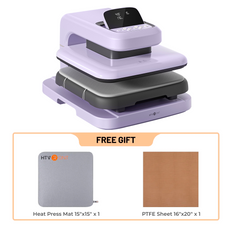
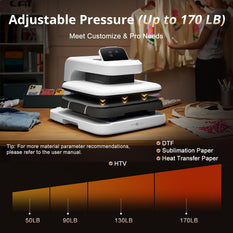
Find the right HTVRONT heat press for every creative project — from custom T-shirts and hats to tumblers, phone cases, and DIY gifts. Whether you are just starting out or growing a small customization business, HTVRONT offers beginner-friendly, reliable, and efficient heat press machines for your needs.


Filter:
  • $379.99 Regular price
    Regular priceSale price
    $379.99 $379.99
    • Daisy White
  • $219.99 Regular price
    Regular priceSale price
    $219.99 $284.96
    • Bubble Blue
  • $469.99 Regular price
    Regular priceSale price
    $469.99 $499.99
    • Lavender Purple
    • Daisy White (Shipping Starts Oct 8)
  • $379.99 Regular price
    Regular priceSale price
    $379.99 $439.99
    • White
  • $45.99 Regular price
    Regular priceSale price
    $45.99 $59.99
    • Bubble Blue
  • $369.99 Regular price
    Regular priceSale price
    $369.99 $369.99
    • Lavender Purple
  • $149.99 Regular price
    Regular priceSale price
    $149.99 $149.99
    • Lavender Purple
  • $219.99 Regular price
    Regular priceSale price
    $219.99 $311.91
    • White
    • Light Blue
  • $43.99 Regular price
    Regular priceSale price
    $43.99 $50.99
    • Lavender Purple
  • $569.99 Regular price
    Regular priceSale price
    $569.99 $629.99
    • Daisy White

Heat Press FAQs

What is a heat press?

A heat press is a press machine used to apply controlled heat and pressure to transfer designs onto various surfaces. It is the professional alternative to a household iron for heat transfers.

How it works:
The heat press machine consists of a heated upper platen and a lower base plate. When you close the press, the heated platen applies even temperature and consistent pressure across the entire design area for a set amount of time. This activates the adhesive on materials like heat transfers, bonding them permanently to the surface.

Common applications:
- T-shirts, hoodies, and sweatshirts — the most popular use for any heat press for shirts
- Mugs and tumblers (using a mug press attachment or a dedicated mug press)
- Hats and caps (using a hat press or cap attachment)
- Tote bags, pillowcases, and aprons
- Mouse pads and phone cases

Types of heat presses:
- Manual (clamshell or swing-away) — most common for home and small business use
- Automatic/pneumatic — uses air pressure to close, ensuring consistent force
- Specialty presses — mug presses, cap presses, and hat presses for curved or irregular items

A quality t shirt press or heat press for shirts eliminates the inconsistencies of an iron, delivering professional-quality results every time. If you're looking for the best heat press machine, consider factors like platen size, temperature accuracy, and build quality.

Can you use an iron instead of a heat press?

Yes, you can use a household iron for small DIY heat transfers — but there are significant limitations compared to a dedicated heat press machine.

When an iron can work:
- Small designs (under 4" x 4")
- Occasional hobby projects
- Simple iron-on transfers from craft stores
- When you don't want to invest in a heat press for shirts yet

Why a heat press is better:
- Even heat distribution — An iron has hot spots and cold spots. A press machine maintains consistent temperature across the entire platen.
- Uniform pressure — With an iron, it's nearly impossible to apply the same pressure to every part of the design. A dedicated htv heat press applies even pressure across the whole transfer.
- Precise temperature control — Irons only offer vague settings. A heat press machine for clothes lets you set exact temperatures (e.g., 293°F for smooth HTV).
- Consistent timing — Heat presses have built-in timers. With an iron, you have to guess.
- No steam interference — Irons are designed to produce steam, which ruins heat transfers. You have to turn steam off and wait for it to clear.

The bottom line:
For best results, especially for larger designs, complex materials, or any project you plan to sell or gift, a heat press is strongly recommended.

If you're serious about heat transfer projects, investing in the best heat press machine you can afford will save you time, materials, and frustration in the long run.

How to use a heat press?

Using a heat press is straightforward once you understand the basic steps. Follow this guide for consistent, professional results with your heat transfers.

Step 1 – Preheat the machine
Turn on your heat press machine and set it to the recommended temperature for your transfer material. For an htv heat press application, set it to around 293–311°F depending on the vinyl type. For a sublimation heat press project, set it to 380–400°F. Allow it to fully preheat — typically 5–10 minutes depending on the model.

Step 2 – Prepare the garment
Place your t-shirt or fabric on the lower platen of your heat press for shirts. Pre-press the garment for 2–3 seconds to remove wrinkles and excess moisture. This step is often overlooked but critical for proper adhesion of all heat transfers.

Step 3 – Position the design
Lay your transfer design (e.g., HTV, sublimation print) exactly where you want it on the garment. Use heat-resistant tape to secure it in place, preventing any movement during pressing.

Step 4 – Cover with protective sheet (if needed)
For most transfers, place a Teflon sheet or parchment paper over the design to protect the upper platen from adhesive residue.

Step 5 – Press
Close the press machine and apply the recommended pressure (light, medium, or firm — varies by material). Set the timer according to your transfer's instructions (typically 10–15 seconds for vinyl, 40–60 seconds for sublimation).

Step 6 – Remove and peel
Open the press and remove the garment. Allow it to cool slightly, then peel the carrier sheet according to your vinyl type. Hot peel means removing the carrier sheet immediately after pressing while the vinyl is still warm. Cold peel means waiting until the transfer has fully cooled (usually 2–3 minutes) before removing the carrier sheet. Always check your vinyl manufacturer's instructions to know which method to use.

Step 7 – Final check
Inspect the transfer for any lifting edges or incomplete adhesion. If needed, repress the affected area for 2–3 seconds.

How long to heat press vinyl?

The time needed to heat press vinyl depends on the type of vinyl, the fabric material, and the specific manufacturer's instructions.

Below are general guidelines, followed by HTVRONT's official recommended settings for their vinyl products.

General industry guidelines for HTV:
- Standard HTV: 10–15 seconds at 305°F (150°C), medium pressure
- Glitter HTV: 15–20 seconds at 330°F (165°C), firm pressure
- Flock HTV: 15–20 seconds at 330°F (165°C), firm pressure

HTVRONT Official Recommended Temperature and Time Settings:
When using an htv heat press with HTVRONT vinyl products, follow these specifications for optimal results:

- Smooth HTV145°C (293°F) for 15 seconds
- Patterned HTV145°C (293°F) for 15 seconds
- Puff Vinyl155°C (311°F) for 15 seconds

These settings are optimized for use with any quality heat press machine, including the best heat press machine from HTVRONT's own lineup.

Note that all three HTV types require the same press time of 15 seconds, with only the temperature varying between standard vinyls (293°F) and puff vinyl (311°F).

Factors that affect press time:
- Fabric thickness – Thicker fabrics (hoodies, sweatshirts) may need +2–5 seconds beyond the recommended settings
- Garment moisture – Always pre-press to remove moisture, or you'll need longer press times
- Ambient temperature – In a cold workshop, your press machine may struggle to maintain heat, requiring slightly longer times

Important tips:
- Always follow the specific instructions provided by your vinyl manufacturer — HTVRONT's official settings above are a great reference for their products.
- Do not over-press — pressing too long can burn the vinyl or cause adhesive bleed-out. With HTVRONT vinyls, sticking to 15 seconds is key.
- Do not under-press — insufficient time leads to poor adhesion and premature peeling.
- Keep a pressing log — note the time, temperature, and pressure you used for each vinyl type and fabric combination. This helps you replicate successful results.

Pro tip:
If your vinyl doesn't stick after the first press, you can re-press for an additional 3–5 seconds. However, some heat transfers (especially cold-peel types) cannot be re-pressed effectively, so always check the manufacturer's guidelines first.

For sublimation projects, a dedicated sublimation heat press with higher temperature capabilities (380–400°F) and longer press times (40–60 seconds) is recommended.

Can you heat press polyester?

Yes, you can heat press polyester, but it requires careful handling to avoid damaging the fabric.

Polyester is a synthetic material that is sensitive to high temperatures. Unlike cotton, it can melt, scorch, or develop shiny marks if exposed to excessive heat. For this reason, you should use a lower heat setting than you would for cotton — typically 270–300°F (130–150°C).

Recommended press time: 10–15 seconds (shorter than most other fabrics).
Pressure: Light to medium pressure — too much pressure can leave press marks on the fabric.

Always use a protective sheet, such as parchment paper or a Teflon sheet, between the heat press machine and the polyester fabric. A Teflon sheet is a non-stick, heat-resistant fabric sheet that protects both your transfer and the heat press platen from adhesive residue, scorch marks, and direct heat exposure. It is reusable and highly recommended for all heat press projects.

Pro tips for pressing polyester:
- Test on a small area first — such as inside a seam or hem — to ensure the settings won't damage the fabric.
- Use a heat press pillow or pad underneath the shirt to prevent seam impressions from showing through.
- If you see a shiny mark after pressing, try repressing with a Teflon sheet for 3–5 seconds — this can sometimes remove the shine.
- For sublimation on polyester, higher temperatures (380–400°F) are required, but that works because sublimation heat press technology is designed to bond ink with polyester fibers at high heat. Regular htv heat press applications on polyester should use the lower temperature range mentioned above.

How much is a heat press machine?

A heat press machine typically costs between $100 and $500 for entry-level models.
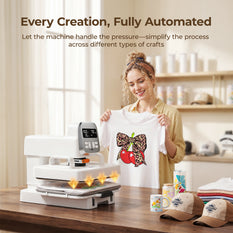
Within this range, a basic heat press often includes a 12"x10" or 15"x15" platen, suitable for hobbyists who do occasional heat transfers.

Professional-grade units range from $500 to $2,000+, offering digital controls, swing-away designs, and larger platens.
If you need a heat press for shirts that can also handle hoodies, jackets, or bags, expect to pay closer to the higher end.
A quality shirt heat press is a worthwhile investment if you sell custom apparel. For those working with sublimation, a dedicated sublimation heat press may cost slightly more due to higher temperature requirements.

So what is the best heat press machine for your budget? Take HTVRONT as an example. Their Auto Heat Press 1, Auto Heat Press 2, and A100 Multi Heat Press deliver precise, stable temperature control along with automatic pressing functionality — features typically found on machines costing twice as much. These models work excellently for both htv heat press applications and general heat transfers, and they easily accommodate the recommended settings (293°F for smooth/patterned HTV, 311°F for puff vinyl) with perfect accuracy. The HTVRONT H10 goes even further by providing real-time pressure feedback, allowing you to precisely control pressure with visual confirmation — a feature that makes it a top contender for the best heat press machine in its price range.

HTVRONT achieves this by selling directly to customers (cutting out middlemen), streamlining production, and focusing on high-volume, low-margin business model. The result is a press machine that offers commercial-grade reliability without the commercial-grade price tag — making professional results accessible to hobbyists and small business owners alike.
How to Heat Press a Handle Tumbler with HTVRONT A200

How to Heat Press a Handle Tumbler with HTVRONT A200

Tia Isom

Covers A200 handle tumbler pressing — swap to handle module, select D Mode (200°C, 160s), print mirrored designs in 3 sections, wrap with heat tape and mat, press, then hot...

How to Use an HTVRONT H17 Phone Case Heat Press

How to Use an HTVRONT H17 Phone Case Heat Press

Mercy Lilian

Covers H17's vacuum technology for curved phone cases (up to 135°), badges, coasters, and keychains. Includes settings chart, HTVRONT IdeaStudio workflow, hot peel method, and troubleshooting for faded prints.

heat press on a tote bag

[Tote Bag Tutorials] How to Make A Tote Bag with HTVRONT T Shirt Heat Press By Using An Old Apron

Lindsey Roberts

HTVRONT’s tutorial shows how to upcycle an old apron into a stylish, heat-pressed custom tote bag.

Three t-shirts with printed designs: one with palm trees, one with 'Happy Mama Bear', and one with a pink design on a wood slice.

HTVRONT Vinyl Cutting & Heat Transfer Official Settings Guide (2026 Edition)

HTVRONT

Covers blade depth, pressure, and speed for basic, special-effect, and sublimation HTV on Silhouette Cameo 3 & 4. Includes heat press temperature matrix, iron alternative, troubleshooting real cases, and storage...

A pink baseball cap with a logo on a purple background, with the text 'HOW TO MAKE HATS FOR SELL AT HOME?' in a yellow box.

Hat Press 101: Your Go-To Guide from Beginner to Pro

HTVRONT

Your guide to hat heat presses! Learn machine types, operation, materials, safety & creative tips for DIY or business.

How to Press DTF Transfers with Heat Press

How to Press DTF Transfers with Heat Press

Mokua Brian

Print mirrored designs on DTF film, dust with adhesive powder while wet, cure at 380°F (2‑3 min), then press onto fabric at 380°F for 40‑60 sec. Add a second powder...

This covered image shows a black T-shirt with emoji designs.

[Inspiration Tutorials] How to Make An Emoji T-shirt with HTVRONT Manual Heat Press

Mokua Brian

DIY emoji shirt guide: 4 methods—iron-on transfer, heat transfer vinyl (HTV), digital printing, and hand-painting. Step-by-step tutorials with materials list, trending emoji data, care tips, and beginner-friendly advice for custom...

This covered image shows 3 youngs and call-to-action

HTVRONT DIY Material Tutorials

HTVRONT

Complete DIY guide: vinyl cutters for adhesive vinyl, printable vinyl, and HTV; heat press techniques for heat transfer paper, sublimation, and sublimation HTV. Includes step-by-step tutorials, material comparison table, and...

Read More >>
How to Price HTV, Sublimation, DTF, Embroidery & Laser Crafts in 2026

How to Price HTV, Sublimation, DTF, Embroidery & Laser Crafts in 2026

Tia Isom

Pricing guide for five decoration methods — HTV, sublimation, DTF, embroidery, and laser engraving. Includes the core pricing formula, 2026 blank cost reference, labor estimates, equipment depreciation, and cross-method profit...

DIY Apparel Printing in 2026: Which Method Makes the Most Money?

DIY Apparel Printing in 2026: Which Method Makes the Most Money?

Tia Isom

Compares four DIY apparel printing methods — HTV (starter-friendly, $15–30), DTF (high-volume, $20–50), sublimation (sportswear, $25–60), and embroidery (premium, $30–100). Includes startup costs, selling prices, and 2026 market trend analysis...

What Is Sublimation Paper Used For

What Is Sublimation Paper Used For

Tia Isom

Sublimation paper uses guide: polyester apparel (T-shirts, jerseys), coated drinkware (mugs, tumblers), hard goods (puzzles, coasters), promotional products, and what NOT to use it on.

What is the best sublimation paper

What is the best sublimation paper

Tia Isom

Best sublimation paper guide: compare A-SUB, Siser, HTVRONT, Beaver Paper by ink release (90-99%), drying speed, price ($0.11-$0.50/sheet), and choose based on your needs and budget.

Back-to-School DIY with the A100 Multi Heat Press: Custom Sashes, Shirts, Hats & More

Back-to-School DIY with the A100 Multi Heat Press: Custom Sashes, Shirts, Hats & More

Tia Isom

Ready for the first day of school? With the HTVRONT A100 Multi Heat Press, you can create personalized sashes (video tutorial included!), matching shirts, custom hats, teacher mugs, and no-lost...

How to Wash DTF Shirts and Keep That Soft, Rubbery Feel

How to Wash DTF Shirts and Keep That Soft, Rubbery Feel

Tia Isom

Learn how to wash and care for DTF printed shirts to prevent cracking, peeling, and fading. This guide covers proper washing techniques, drying methods, and common problems like wrinkling and...

How to Wash HTV Shirts So They Never Peel or Fade: The Complete Guide

How to Wash HTV Shirts So They Never Peel or Fade: The Complete Guide

Tia Isom

This guide covers everything you need to know about washing and caring for HTV shirts. From the crucial 24‑hour waiting period after pressing to the best detergent and drying practices,...

DTF transfer sheet curing on a heat press with parchment paper and craft tools on a wooden worktable

How to Cure DTF without Oven

Tia Isom

Learn three ways to cure DTF prints without a curing oven. This guide covers using a heat press, a household iron, and the air-dry method—complete with temperature settings, step-by-step instructions,...

Read More >>
How to Use Auto Heat Press 2

How to Use Auto Heat Press 2

Tia Isom

Your browser does not support the video tag. Watch the tutorial and discover how the HTVRONT Auto Heat Press 2 simplifies your heat transfer projects with its automatic features and...

What is A100 Auto Multi Heat Press

What is A100 Auto Multi Heat Press

Tia Isom

The HTVRONT A100 Auto Multi Heat Press is an all-in-one 3-in-1 automatic heat press. With its tool-free quick-swap design, it handles flat press (T-shirts), hat press (caps), and tumbler press...

How to Heat Press Shirts with A100 Auto Multi Heat Press

How to Heat Press Shirts with A100 Auto Multi Heat Press

Tia Isom

The HTVRONT A100 Auto Multi Heat Press is a 3-in-1 automatic heat press with tool-free quick-swap design for flat press, hat press, and tumbler press. This tutorial shows you how...

D2 DTF Printer printing Mother's Day T-shirts

Love You, Mom! Business Inspiration for D2 DTF Printers

Tia Isom

No clogged printheads. No costly maintenance. No heavy upfront investment. The D2 DTF Printer is the worry-free start for your DTF business. The heat press featured in this video is...

Preheat, dry, and perform vacuum sublimation. New phone case ready

Preheat, dry, and perform vacuum sublimation. New phone case ready

Tia Isom

Your browser does not support the video tag. The heat press featured in this video is the H17 Phone Case Heat Press — designed for precise, professional sublimation results at...

White H17 Phone Case Heat Press

Making Cute Teddy Bear Phone Cases Using the H17 Heat Press - Sublimation Idea

Tia Isom

Your browser does not support the video tag. The heat press featured in this video is the H17 Phone Case Heat Press — a compact, easy-to-use machine designed specifically for...

Hand-Draw Your Love - Creative Sublimation Ideas for Phone Cases

Hand-Draw Your Love - Creative Sublimation Ideas for Phone Cases

Tia Isom

Your browser does not support the video tag. The heat press featured in this video is the H17 Phone Case Heat Press — designed to bring your hand-drawn artwork to...

Heat Press Kraft paper bag with H1 Mini Heat Press

Bring your DIY Kraft paper bag creations to life with the H1 Mini Heat Press

Tia Isom

Your browser does not support the video tag. The heat press featured in this video is the H1 Mini Heat Press — compact, portable, and perfect for DIY projects on...

Read More >>