DTF transfer has recently emerged as an unprecedented screen printing technology that has taken everyone by surprise. This is also considered rather versatile when producing highly condensed and full-colored photographs on different materials.
This article provides a well-organized and comprehensive guide to DTF Printer, as well as step-by-step instructions so you can master the process yourself. We will also explain why transfers are becoming more popular and point out their advantages and disadvantages over conventional methods such as screen printing and heat transfer vinyl. Furthermore, we will be providing tips from inside to make the application of DTF transfers smooth and successful. From basic to pro, all in one guide!
1. What is Direct to Film (DTF)?
DTF is one of the newest printing techniques that revolutionize how different designs are transferred to various materials, mostly fabrics.
DTF means Direct to Film, which is the process of printing designs onto a special film which is then heat and press transferred onto fabric. It allows for vibrant prints with a lot of detail to be printed on various different materials.
Flexibility is DTF’s greatest advantage. It can produce bright and elaborate prints on various surfaces such as cotton, and polyester, and even on non-fabric materials like metal and plastics. This makes it ideal for small runs as well as large-scale commercial projects. Besides this, there is no need to treat any fabrics before doing DTF printing which makes things simpler and quicker.
One of the advantages of DTF printing is the excellent quality of the prints. The colors are bright, the details are sharp and the prints last longer without fading, cracking, or peeling. Now that you have learned what DTF is, it is time to discuss the necessary procedures you should consider to achieve a successful DTF transfer.
2. How to Make DTF Transfers
Making DTF transfers is simpler than you’d imagine, and the end products are nothing less than astonishing. This segment will take you through the whole process in an easy-to-follow guide to help you accomplish professional style transfers in your own house.
What You’ll Need:
Hand Gloves
DTF Printer
Storage Container with lid
Convection oven
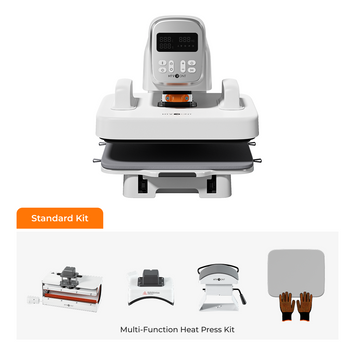
Heat Press
T-shirt
Step 1: Print Preparation
After creating your design, select the "Print Color First" option on your printer. Doing so allows the color layer to go down on the film first, then the white ink. Even though it might come off as an inconsequential step, this is an important factor in determining how great the quality of your transfer will be eventually.
Step 2: Sprinkle Rubberized Powder
Now, wear your hand gloves, take a storage container with a lid place your printed film inside, and sprinkle the rubberized powder. Shake and move the film gently in order to make sure that all parts of your design are properly covered.
Note: This specific powder will become the adhesive when transferring your print onto your clothing. It’s therefore important that you get a uniform coat. Additionally, ensure you tap off the excess powder for a smooth and even coverage across the surface of your film.
Step 3: Curing The Transfer
Once you have applied the powder, the next thing you have to do is cure the transfer. This generally calls for the use of an outside heat source like a convection oven. Set your heat source to a temperature of 200°F and maintain it for approximately 90 seconds. Initially, it might appear wet, but as time goes by, you may notice some change in texture as well. The smoother feel will tell you that it’s ready for pressing.
Step 4: Press the Transfer
Heat the press to 330°F, and prepare the shirt for the first press by laying it out and placing your design carefully. You want to press the transfer with the shirt facing backward; this will most probably help you with spacing and alignment. Cover your design with a Teflon sheet and press for 15 seconds with medium to firm pressure.
Step 5: Press It a Second Time
Press your shirt for a second time for about 5-10 seconds after the first peel. This guarantees that the design has been adhered to fully and the shirt is ready to be worn. And the result? An attractive multicolored print that will give you an edge!
3. Advantages and Disadvantages of Making DTF Transfers
DTF printing is causing a revolution in fabric customization, presenting a unique mix of versatility, detail, and durability. However, like any other technique, it has certain pros and cons.
Benefits
Drawbacks
Versatile
Works on various fabrics and colors.
High cost
Requires significant upfront investment.
Precision
Handles intricate designs with accuracy.
Learning Curve
Mastering the technique takes time and practice.
Durability
Resists wear and tear, maintaining quality.
Design Limitations
May not be ideal for very fine details or large color palettes.
4. Tips for Successful DTF Transfer Application
The following will ensure a high-quality result for a successful DTF transfer application:
Preparing the Fabric: Make sure that before applying DTF transfer, the fabric has no lint or bumps. With your heat press, pre-press the paper to remove the moisture in return and smooth out the fabric as flat as possible to make the transfer.
Design Optimization: Using sharp, high-resolution images with vector graphics gives great prints. Appropriately using color profiles and design settings is essential for a more polished look in design.
Heat and Pressure Settings: Follow the recommended heat and pressure settings from your manufacturer. Your settings can lead to poor adhesion or garment damage if not done properly.
Test Prints: Always try out a sample print before printing out a whole batch, preferably on the same kind of fabric as that in mind. This will help you adjust your presets for better results.
Peeling Technique: There are a number of peeling techniques, such as hot peel, warm peel, or even cold peel. Try to see how each one reacts to the transfer film and the fabric itself. This can help you avoid making some very costly mistakes.
✓ DTF Transfer Quick Checklist
□ Use high-resolution vector graphics for design.
□ Pre-press the fabric to remove moisture and lint.
□ Follow manufacturer's recommended heat and pressure settings.
□ Print with "Color First" option for better opacity.
□ Apply rubberized powder evenly and tap off excess.
□ Cure the transfer at 200°F for 90 seconds.
□ Press at 330°F for 15 seconds with medium-firm pressure.
□ Perform a second press for 5-10 seconds after peeling.
□ Always test prints on similar fabric before bulk runs.
Frequently Asked Questions
Quick answers to the most common questions about DTF transfers.
What is the difference between DTF and HTV?
DTF (Direct to Film) involves printing a design onto a special film, applying adhesive powder, and then heat-pressing it onto the fabric. HTV (Heat Transfer Vinyl) involves cutting a design out of colored vinyl sheets and then heat-pressing it onto the fabric. DTF is better for complex, multi-colored designs, while HTV is simpler for single-color or simple designs.
Can I use DTF on 100% cotton?
Yes, one of the biggest advantages of DTF is its versatility. It works exceptionally well on 100% cotton, as well as polyester, blends, and even hard surfaces like metal and wood.
Do I need a special printer for DTF transfers?
Yes, DTF printing requires a specialized printer equipped with pigment inks (CMYK plus white) that can handle the DTF film. Standard inkjet or laser printers are not suitable for this process.
Why is my DTF transfer cracking after washing?
Cracking usually occurs due to insufficient curing of the adhesive powder, incorrect heat press settings (temperature or pressure too low), or using low-quality DTF film or ink. Ensure you are following the recommended curing time and heat press parameters.
Is DTF printing more expensive than screen printing?
For small to medium runs, DTF is often more cost-effective than screen printing because there are no setup fees or minimum order quantities. However, for very large bulk orders, screen printing can be cheaper per unit due to economies of scale.
Bottom Line
There are limitless customization opportunities when creating DTF transfers. Expect your designs to turn out animated with bright hues and fine details. This technique can take your projects to the next notch if you are just doing it as a hobby or running a small business. It is important to remember that every step in this process greatly contributes in achieving consistent and professional results.
By practicing and paying attention to details, you’re on the right path to producing beautiful and durable transfers. And if you have any questions and you need answers, we’re here for you. Happy printing!


 Cart Unlocks Add-On Deals