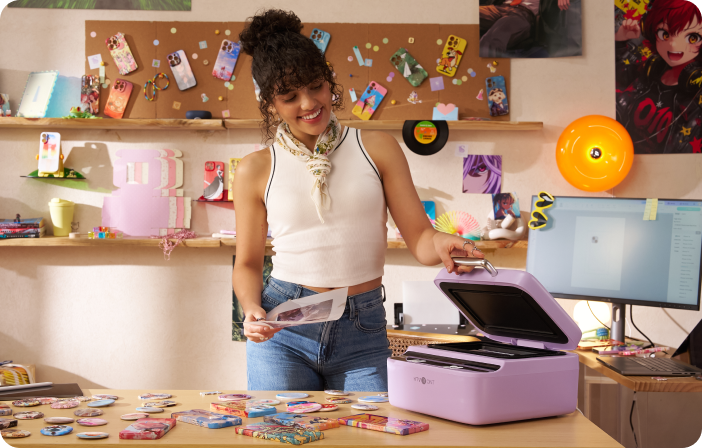
New Arrival!HTVRONT CA H17 Phone Case Heat Press
$369.99
$369.99
$369.99
Unit price
per
Promotional discount
optimal discount strength!
00
00
00
00
C$60 off
Code: CA60
Copy Code
Standard Kit A( Compatible With iphone.)
$369.99
$369.99
Unit price
per
Standard Kit B( Compatible With Android.)
$369.99
$369.99
Unit price
per
Beginner Kit
$409.99
$409.99
$435.97
Unit price
per
Start-up Kit
$439.99
$439.99
$498.91
Unit price
per
A Better Choice for Phone Case Making
HTVRONT H17 Phone Case Heat Press
Introducing the Star - HTVRONT H17
Phone Case Customization / New DIY Trends / Perfect for Small Business
See the Difference You Can Create
From vivid colors to seamless wraps, every detail looks made to sell.
Auto-Fit for Every Phone Model
IdeaStudio matches your design to the right phone case template in seconds.
One Press, All Handled
Just press “Start” — the machine handles the rest.
One Mold, Fits Multiple Phone Models
Specialized molds flexibly fit most phone cases, so you can customize without worrying about model mismatches.
Built for Easy & Comfort
Empowers Creation with Powerful Features
Create What Matters, Print What Sells
Unlock All Color Creations, For Daily & Business Needs.
All Consumables, All Prepared for U
HTVRONT H17 Is The Best Choice
Included in The Box
Quick Reference Chart
Learn from Pro Reviews
- Honest Expert Reviews
Master Your Craft
- From Beginner to Pro
- From Basics to Advanced
- Learn More
Quick Start
Step 1
Power on the device and set the appropriate parameters
Step 2
Place the phone case fixture into the device. Once preheated, mount the phone case onto the fixture
Step 3
Place the printed sublimation film onto the case and begin heat transfer
Step 4
Once the transfer is complete, peel off the sublimation film while hot
Specifications
Color
Bubble Blue/ Lavender Purple/Daisy White
Input
120V/60Hz 1400W
Temp
100-160℃(210-320°F)
Time
1-600s
Product Dimensions
32.6 x 30.4 x 17.2 cm
12.8 x 12.0 x 6.8 inch
Weight
5.3kg
Heat Press Technology
Vacuum technology and chamberheat transfer technology
Time Setting
1~600s, press once to adjust by 5s up/down
Diverse Accessories Simplify Creations
FAQ
When will my order ship?
Orders will be shipped on a first-come, first-served basis.US local delivery(about 3-10 days).
How to download the LOKLiK IdeaStudio™?
You can download LOKLiK IdeaStudio™ from the following link: https://store.loklik.com/download
What is the after-sales policy? How can I get technical support?
For after-sales service details, please visit: support@htvront.com.If you need any technical support while using the device,feel free to contact HTVRONT Customer Service: support@htvront.com.
What are the usage precautions for the universal phone case fixture?
A1: The fixture is adjustable, and using a small support to fill gaps can improve transfer results (tweezers can be used for assistance);
A2: Use a camera pad of the appropriate size and secure it with high-temperature tape for better heat transfer results;
A3: For Android models, select the suitable R-corner from the provided set for installation. (No need to change the R-corner for Apple models.)
How to ensure the best heat transfer results?
A1: Use a sublimation printer, and ensure the printed image's ink is completely dry before use. As shown, you can place the printed image above the device’s cover to speed up the drying process or use the oven to dry it up (Recommend parameters: Temp: 40℃ Time: 2-3 mins );
A2: Always use A4-sized sublimation film, ensuring it is aligned flat in the heating chamber to avoid vacuum sealing failure;A3: If the printed sublimation film is not used immediately, store it in a sealed container to prevent moisture absorption, which can affect the heat transfer;It is recommended to use it within 4 hours after printing
What should be noted when heat pressing badges?
A1: Use the badge fixture and place the pin side into the slot of the fixture;
A2: Use A4-sized sublimation film;A3: Use LOKLiK IdeaStudio™ for image printing.
How to heat transfer onto coasters, ceramic plates, and other flat substrates?
A1: Place the substrates on the base plate;
A2: If pressing multiple items, ensure at least 1 cm of space between substrates and between substrates and the heating chamber walls;
A3: Use A4-sized sublimation film.
What is the unusual smell when using the machine?
The smell is likely from the sublimation ink evaporating or the lubricant on the fixture volatilizing. This is a normal occurrence.
What to do if the printing fails?
A1: Please use a sublimation printer and ensure it supports media thicker than 0.3 mm.
A2: Set the print size to A4. It is recommend to select “Transparency” or “Thick Paper” as the paper type.
A3: The film may affect sensor detection or cause feeding issues due to its transparency or smooth back. Attach a sticker to the edge or an A4 sheet to the back to improve performance.
What are the adjustable size ranges of the phone case fixture?
A1:For Android phones: Width: 69–79 mm, Length: 148–172 mm;
For iPhones: Width: 69–79 mm, Length: 145–167 mm.
How to use the sublimation film properly?
Do not cut the sublimation film. Make sure the film fully covers the silicone ring to ensure a proper vacuum seal.
What is the purpose of the camera lens pad?
A1: Ensures heat transfer around the lens pad area;
A2: Provides structural support to prevent deformation;
A3: Fills the gap to prevent the film from tearing under vacuum (*a damaged film may affect heat press results).
Why is there a color difference between the original image and the transferred design?
A1: This may be due to your printer model or the type of ink used. Try performing color correction and cleaning the printhead;
A2: If the final result looks too yellow, reduce the yellow ink output in the printer settings;
A3: Glossy phone cases tend to produce more vibrant results than matte ones—choose the type that suits your preference;
A4: Make sure to follow the recommended heat pressing settings. Over-pressing may also affect color accuracy.
HTVRONT reserves final interpretation rights for this event.


Cart Unlocks Add-On Deals