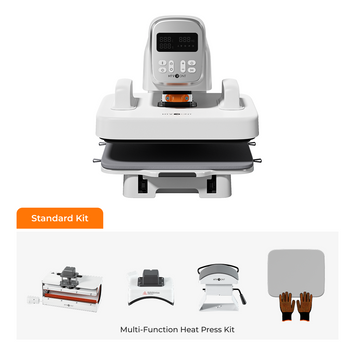
Welcome to the HTVRONT A100 Auto Multi Heat Press tutorial series.
The A100 Auto Multi Heat Press is an intelligent, fully automatic heat press with a tool-free quick-swap design that lets you switch between flat press, hat press, and tumbler press modules — making it a true automatic 3-in-1 heat press machine. This is the first tutorial in our A100 series, focusing on how to use the 12×10 in flat heat plate for T-shirts and HTV projects.
💡 Series Navigation:
📘 Lesson 1: How to Use A100 Flat Heat Plate — T-Shirt & HTV Pressing (this guide)
The A100 is designed for advanced DIY creators and light-business custom sellers who want to scale their heat pressing capabilities. By combining automation technology with a versatile modular structure, we've redefined the traditional multi-function heat press experience — allowing creators to work more efficiently and consistently on a single device across multiple project types.
📦 Materials Preparation
What's in the Package Box
✅ HTVRONT A100 Auto Multi Heat Press x 1
✅ 12×10 in Heat Plate x 1
✅ 20 oz Tumbler Heat Plate x 1
✅ Large Hat Heat Plate x 1
✅ 12×10 in Heat Press Mat x 1
✅ Quick Start Guide x 1
✅ Heat-Resistant Gloves x 1 Pair
📌 Note: This tutorial focuses on the 12×10 in Heat Plate. The 20 oz Tumbler Heat Plate and Large Hat Heat Plate will be covered in future tutorials.
Additional Supplies You'll Need
👕 T-shirt (or other garment)
🎨 Design (HTV / DTF / Sublimation print)
🛡️ PTFE sheet (non-stick protective sheet)
💡 Material Tip: If your design is made with HTV material or DTF printing, you can use garments made of any fabric. However, if your design is printed with sublimation ink, you'll need a garment with polyester fiber content above 70% for optimal color vibrancy.
⚙️ Step-by-Step: How to Use A100 Flat Heat Plate
Follow these steps carefully. The entire process takes about 10 minutes.
📍 Part 1: Mode Selection & Setup
⚠️ Before you begin: Make sure you're wearing heat-resistant gloves to avoid burns and any potential injuries.
Plug in the power — but do NOT connect the heat plate connector yet.
For the first startup, the machine defaults to T-shirt Mode. To use other heating plates, press and hold the "Mode" button to enter mode selection.
Briefly press the "Mode" buttonto choose your desired mode:
👕 T-shirt Mode (for flat plates)
☕ Tumbler Mode (for cup/tumbler plates)
🧢 Hat Mode (for cap/hat plates)
⚙️ Custom Mode (for thick materials)
Briefly press the "Start" button to confirm your selection.
Install the Heating Plate
Hold the 12×10 in Heat Plate with both hands and align it with the slot.
📌 Note: The side with the HTVRONT logo is the front. If positioned the other way around, the heat plate will not install properly.
Place your thumbs against the upper part of the machine for added support, then push upward until the heat plate is securely locked in place.
Place the heat press mat onto the ironing board. Hook the four elastic straps onto the hooks on both sides to keep the mat securely in place.
Connect the heat plate connector — align it with the arrow as shown and insert it firmly until fully secured.
📍 Part 2: Settings & Preheating
Press the power button, then set your temperature, time, and pressure according to the Quick Reference Chart.
Example settings for DTF design:
🌡️ Temperature: 300°F
⏱️ Time: 15 seconds
💪 Pressure: 150 lb
The "Start" button will turn red, indicating the machine is heating up.
⚠️ Safety note: Once the machine starts heating, wear heat-resistant gloves and avoid touching the heat plate or ironing board with bare hands.
When you hear a beep and the "Start" button turns green, the machine is ready.
Push the ironing board back in until you hear a beep.
Press "Start" — the machine will lower automatically and begin pressing.
When the countdown finishes, the machine lifts up with a beep.
Pull out the ironing board and remove your finished piece.
📍 Part 4: Working with Thick & Large Materials
📏 For Thicker Materials
Plug in the power cord to supply power to the machine. Ensure the machine is in standby mode with the heat plate connector disconnected.
Press and hold the "Mode" button to enter mode selection — the current mode icon flashes on the display screen.
Press the "Mode" button and choose Custom Mode. Briefly press the "Start" button once to confirm selection.
After installing the 12×10 in Heat Plate (per previous instructions), press and hold the "+ / -" buttons to freely adjust the machine height.
Once the desired height is reached, briefly press the "Start" button again to confirm and complete the height setting.
Note: This mode allows height adjustment up to 5.12 inches (13 cm).
Press the "Power" button again, then repeat the steps mentioned earlier to set temperature, time, and pressure, and start the heat pressing process.
📐 For Larger Designs
The 12×10 in Heat Plate can be used independently.
Detach the heat plate while keeping the heat plate connector connected.
The 2.62 ft (80 cm) cable allows flexible movement for pressing larger items like blankets or oversized fabrics.
⚠️ Custom Mode Note: Custom Mode is specifically designed for thicker materials (multi-layer fabrics, wooden boards, etc.) where additional height clearance is needed. For standard T-shirts and HTV, T-shirt Mode is recommended.
📺 Video Tutorial: A100 Flat Heat Plate
Watch the 5-minute 20-second video below for a complete visual walkthrough of the A100 flat heat plate process.
The HTVRONT A100 Auto Multi Heat Press is a 3-in-1 automatic heat press with tool-free quick-swap design for flat press, hat press, and tumbler press. This tutorial shows you how to heat press t-shirts using the A100 flat heat plate — from mode selection and temperature settings to achieving professional, long-lasting transfers.
📊 Quick Reference: A100 Flat Heat Plate Settings
🔧 Troubleshooting Common Issues
Issue
Possible Cause
Solution
Heat plate won't install
Wrong orientation
Ensure HTVRONT logo faces front
Machine won't start
Heat plate connector not fully inserted
Push connector in until it clicks
Uneven transfer
Insufficient pressure or uneven placement
Increase pressure; ensure garment lies flat
Design peeling after wash
Temperature too low or time too short
Adjust settings per Quick Reference Chart
📚 What's Next in the A100 Tutorial Series?
You now know how to use the A100 flat heat plate for T-shirts and HTV projects. In the next tutorials, we will cover:
🧢 Lesson 2: How to Use A100 Hat Heat Plate — Cap Pressing Guide
☕ Lesson 3: How to Use A100 Tumbler Heat Plate — 20 oz Sublimation Guide
Q: Can I use the A100 flat heat plate for materials other than T-shirts?
A: Yes! The flat heat plate works great on tote bags, pillowcases, aprons, and any flat fabric surface within the 12×10 inch pressing area.
Q: Why won't my heat plate install properly?
A: Check that the HTVRONT logo is facing forward. The plate only installs correctly in one orientation.
Q: What's the difference between T-shirt Mode and Custom Mode?
A: T-shirt Mode is optimized for standard garment pressing. Custom Mode allows you to adjust the machine height up to 5.12 inches (13 cm) for thicker materials like multi-layer fabrics or wooden boards.
Q: Can I use the flat heat plate without the heat press mat?
A: The heat press mat is recommended for even pressure distribution and to protect your work surface. For best results, always use it.
Q: The Start button stays red and won't turn green. What's wrong?
A: The machine is still heating up. Wait until it reaches the set temperature — the button will turn green when ready. If it takes too long, check that the heat plate connector is fully inserted.


 Cart Unlocks Add-On Deals