Introduction
Using a heat press to customize tumblers is one of the best ways to create professional‑quality, long‑lasting designs for personal use, gifts, or small business products. Whether you're working with sublimation or heat transfer vinyl (HTV), a heat press ensures consistent heat and pressure for a flawless finish. Because tumblers have a curved surface, using the right technique is essential to avoid blurry edges or incomplete transfers. This guide walks you through the complete process—step by step—so you can confidently produce stunning custom tumblers at home.
Let's start by looking at why a heat press is the go‑to tool for tumbler projects.
Why Use a Heat Press on a Tumbler?
A heat press delivers consistent, even heat and pressure around the tumbler's curved surface—producing durable, vibrant designs that last far longer than manual methods like stickers or decals.
Compared to using a household iron or hand‑applying vinyl, a heat press is faster and far more reliable. It ensures that every part of your design bonds correctly, eliminating bubbles, wrinkles, and weak spots. For hobbyists and small business owners alike, a dedicated tumbler press is the key to achieving repeatable, professional results.
Before you begin, make sure you have all the right supplies at hand.
Materials Needed
-
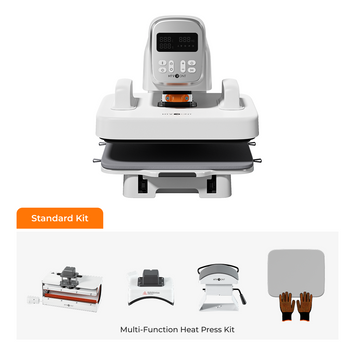
Tumbler Heat Press: A press specifically designed for curved surfaces like tumblers or mugs.
-
Sublimation Tumblers: Tumblers with a special polymer coating for sublimation. For HTV, any smooth‑surface tumbler works.
-
Design Software: HTVRONT IdeaStudio offers a rich library of templates and graphics, and is compatible with HTVRONT Vinyl Cutters for seamless design‑to‑cut workflow.
-
Heat‑Resistant Tape: Secures your design in place during pressing.
-
Heat‑Resistant Gloves: For safely handling hot tumblers.
-
Silicone Wraps or Pads (Optional): Helps apply even pressure on curved surfaces.
-
Ruler or Measuring Tool: For precise design alignment.
-
Lint Roller: Removes dust and debris from the tumbler surface.
-
Alcohol Wipes: Cleans the surface for a strong, lasting bond.
With your materials gathered, let's walk through the process from start to finish.
Step‑by‑Step Instructions
Step 1: Prepare Your Design
-
Using HTVRONT IdeaStudio: Open IdeaStudio and browse its extensive library of templates and graphics. Use the editing tools to customize your design—adjust size, colors, and details. When ready, send it directly to the HTVRONT Vinyl Cutter for precise cutting.
-
For Sublimation Printing: Design in IdeaStudio, then print onto sublimation paper using a sublimation printer. Mirror your image so it transfers correctly. If you're unsure about paper types, check our guide on what is sublimation paper.
-
For HTV: Cut your design on heat transfer vinyl using the Vinyl Cutter. Weed away the excess vinyl, leaving only the parts you want to transfer.
Step 2: Clean the Tumbler
Wipe down the entire tumbler surface with alcohol wipes to remove grease, dust, and fingerprints. Follow up with a lint roller for a perfectly clean surface—this is essential for strong adhesion.
Step 3: Secure the Design
Position your design firmly against the tumbler. Use heat‑resistant tape to hold it in place, ensuring there are no bubbles, wrinkles, or gaps. For HTV, make sure the vinyl lies completely flat.
Step 4: Preheat the Heat Press
Set your tumbler heat press to the correct temperature and time based on your material:
-
Sublimation: 350–400°F (175–200°C) for 40–60 seconds. For a complete breakdown of pressing times and temperatures, see our guide on how long to heat press a sublimation tumbler.
-
HTV: 300–320°F (150–160°C) for 10–15 seconds.
Adjust the pressure so the tumbler is held firmly but not crushed.
Step 5: Heat Press the Tumbler
Place the tumbler into the press with the design positioned evenly. Close the press and start the timer. For larger designs, rotate the tumbler halfway through to ensure even heat distribution. If using a silicone wrap, secure it tightly around the tumbler before pressing.
Step 6: Remove and Cool
Once the timer ends, carefully remove the tumbler using heat‑resistant gloves—it will be extremely hot. Let it cool for a few minutes before proceeding to the next step.
Step 7: Peel Off the Design
-
Sublimation: Peel the paper while the tumbler is still warm—this is a hot peel. Waiting until it's fully cooled can cause ghosting or blurry edges.
-
HTV: Most standard HTV requires a cold peel—wait until the tumbler is completely cool before removing the carrier sheet. However, specialty vinyls like Puff HTV often need a hot peel to achieve the desired raised effect. Always check the manufacturer's instructions for your specific vinyl type.

What if you don't own a dedicated tumbler press? Let's look at the alternatives.
Can Flat Heat Presses or Mini Heat Presses Be Used for Tumblers?
Can a Flat Heat Press Be Used for Tumblers?
Flat heat presses are built for flat items like T‑shirts and tote bags. Because a tumbler has a curved surface, a flat press can't apply even pressure—this often leads to incomplete or blurry transfers. Silicone wraps or specialized curved attachments can help, but results are rarely as consistent as with a dedicated tumbler heat press.
Can a Portable Mini Heat Press Be Used for Tumblers?
Portable mini heat presses (like the HTVRONT H1 Mini Heat Press) are compact and flexible enough to handle curved surfaces. However, two major challenges arise:
-
Uneven Heat and Pressure: Manual pressure on a curved surface is hard to keep consistent, which can cause patchy transfers.
-
Time and Efficiency: The small heating area means you'll need to reposition the press multiple times—increasing the risk of misalignment and taking significantly longer.
Mini presses can work for small, simple designs, but for frequent tumbler customization, investing in a dedicated tumbler press is strongly recommended.
Best Practices
-
Choose the Right Tumbler: Sublimation requires a polymer‑coated tumbler; HTV works on most smooth surfaces.
-
Secure the Design: Loose or wrinkled designs cause uneven transfers. Use heat‑resistant tape generously.
-
Test First: Always run a test on a spare tumbler to verify your settings before committing to a final project.
-
Rotate for Evenness: For larger designs, rotate the tumbler halfway through the press cycle.
-
Cool Before Handling: Allow the tumbler to cool completely before washing or using it to protect the design.
Frequently Asked Questions
Can I use a regular household iron instead of a heat press for tumblers?
A household iron can't provide the even heat and consistent pressure needed for a curved tumbler surface. You'll likely end up with patchy, incomplete transfers. A dedicated tumbler heat press or a convection oven with shrink wrap is the recommended alternative.
Why do I need to mirror my design for sublimation but not for HTV?
Sublimation paper is placed face‑down on the tumbler, so the image must be mirrored to appear correctly after transfer. HTV is cut from the back and placed face‑up, so no mirroring is needed.
What's the difference between hot peel and cold peel for HTV?
Hot peel means removing the carrier sheet immediately after pressing while the vinyl is still warm. Cold peel means waiting until it has completely cooled. Most standard HTV uses cold peel, but specialty types like Puff HTV require hot peel for the proper finish.
How long do heat‑pressed designs last on a tumbler?
When applied correctly with the right temperature, pressure, and time, both sublimation and HTV designs can last for years. Sublimation becomes part of the coating and won't peel or fade. HTV is also highly durable but may eventually wear with heavy use or frequent dishwasher cycles.
Conclusion
Using a heat press to create custom tumblers is a straightforward skill that delivers stunning, long‑lasting results. By following these seven steps—preparing your design, cleaning and securing the tumbler, dialing in the right settings, and peeling correctly—you can produce professional‑quality drinkware for yourself, your loved ones, or a growing business. With the right tools, like HTVRONT's IdeaStudio, Vinyl Cutter, and a reliable tumbler heat press, your creative possibilities are endless.


 Cart Unlocks Add-On Deals